
A red light on a Litter-Robot is a status signal, not a verdict — and its meaning changes completely between models. On the Litter-Robot 3 and 4, red is about the cat sensor or a mechanical fault. On the Litter-Robot 5, a blinking red LED means a product fault, and the LCD screen tells you exactly which one.
Identify your model first, then match the exact light pattern below. On the LR4 in particular, “red” alone and “red with flashing yellow” are different faults with different fixes.
The short answer
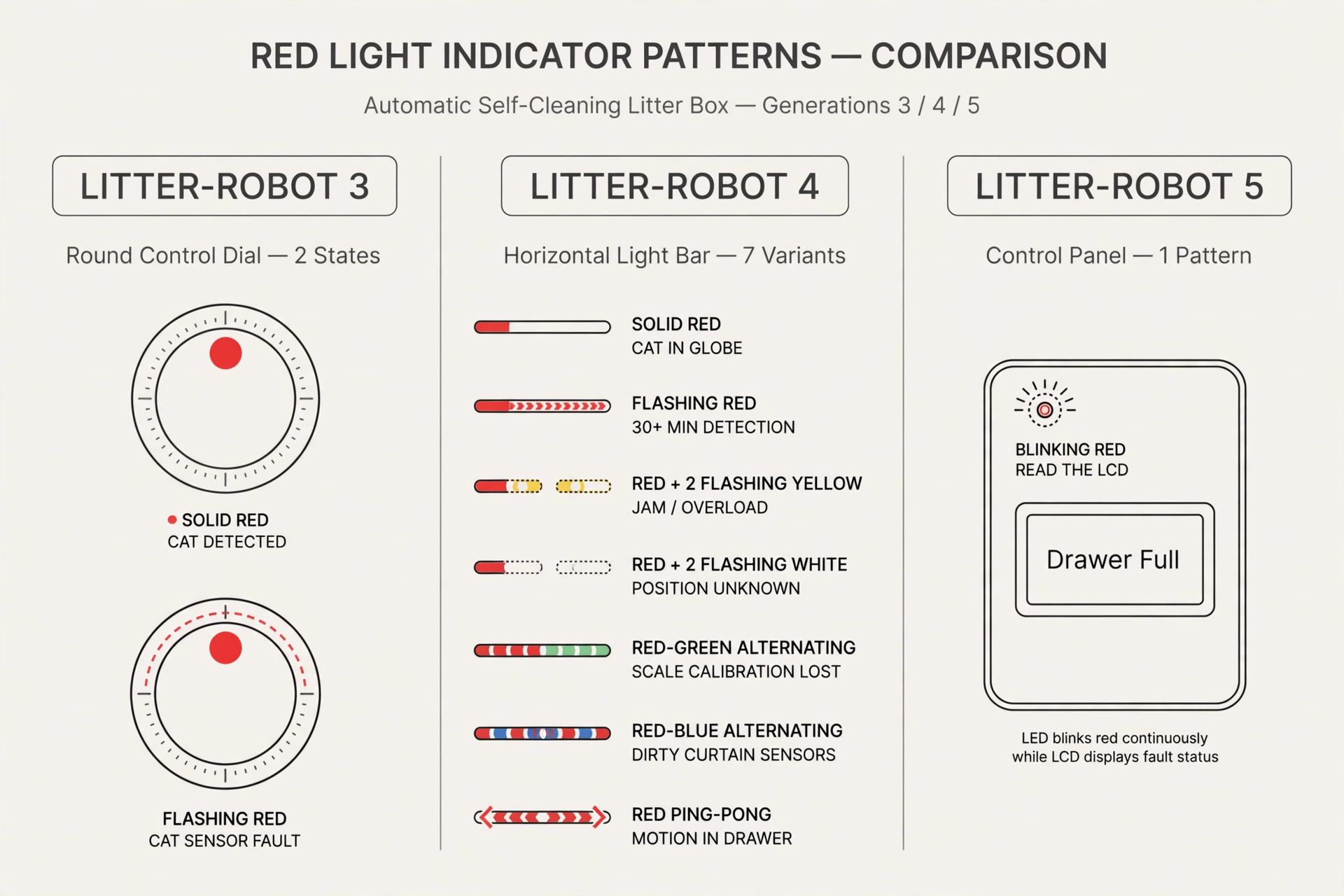
| Model | Red light pattern | What it means (per Whisker) | First step |
|---|---|---|---|
| Litter-Robot 3 | Solid red | Cat sensor activated — a cat entered the globe; the cycle-delay countdown runs after the cat exits | Wait for the countdown, or press Reset to cancel it |
| Litter-Robot 3 | Flashing red | Cat sensor fault — the sensor has been continuously activated for 30 minutes or more | Reduce excess weight, then press Reset |
| Litter-Robot 4 | Solid red | Cat sensor triggered — a cat (or weight) is in the globe | Wait for the countdown, or press Reset |
| Litter-Robot 4 | Flashing red | Cat or weight detected for over 30 minutes | Re-zero the scale: press Reset twice from the Home position |
| Litter-Robot 4 | Red with 2 flashing yellow | Globe jammed or overloaded; motor stopped | Turn the unit off, remove the bonnet and globe, and check for an obstruction |
| Litter-Robot 4 | Red with 2 flashing white | Globe position can’t be detected | Reseat the globe and power cycle |
| Litter-Robot 4 | Red and green alternating | Factory scale calibration values lost | Contact Whisker support — the base needs replacing |
| Litter-Robot 4 | Red and blue alternating | The three curtain (laser) sensors need cleaning | Clean the bezel sensor area |
| Litter-Robot 4 | Red ping-pong (one red light sweeping back and forth) | Motion detected in the waste drawer | Check the drawer for anything inside, then press Reset |
| Litter-Robot 4 | Brief red flash when you press a button | Control Panel Lockout Mode is active (buttons intentionally disabled) | Normal behavior — not a fault |
| Litter-Robot 5 | Blinking red LED | Product fault — the LCD names it (drawer full, drawer removed, etc.) | Read the LCD message first, then fix that specific cause |
Litter-Robot 3
Solid red light: cat detected, countdown running
When the LR3’s cat sensor is activated by a cat entering the globe, the timing light turns solid red. Once the cat exits, the wait-time countdown to a Clean cycle begins. You can cancel the countdown (and the red light) by pressing Reset.
Practical note: if the red light is solid but no cat is inside, the sensor may be reading the unit’s weight incorrectly — treat it like the flashing-red checks below (litter level, placement, then Reset).
Flashing red light: cat sensor fault
A flashing red light means the cat sensor has been continuously activated for 30 minutes or more — either a cat that won’t leave the globe, or too much weight in the unit. Whisker’s official troubleshooting sequence:
Step 1: Check for obstructions and placement issues.
- Put the unit on a firm, level surface. Carpeting or a litter mat under the base can affect the cat sensor.
- Make sure no power cords run underneath the base.
- Keep the unit at least one inch away from walls and furniture; on slippery floors (tile, wood) the unit can shift over time and end up touching a wall.
Step 2: Check the litter and waste drawer.
- Empty the waste drawer, especially if it’s close to full. If you use the Whisker app, press Reset Gauge in the Controls section after emptying.
- Check for excess litter: more than 10 lbs (4.5 kg) can trigger the cat sensor. Keep litter at or below the raised fill line — for heavier litter brands, keep it at least a half inch below the line. Whisker also advises against lightweight litter, which can affect cat detection.
- After any change that affects the unit’s weight, press Reset to recalibrate the weight sensor and circuit board.
Step 3: Power cycle and let it re-measure.
- From the Home position, press Power to turn the unit off, then press Power again. The unit performs an initial Clean cycle and the cat sensor takes a new weight measurement.
Step 4: Test the cat sensor.
- Press the top of the entryway (not the bonnet) down and away, toward the back of the unit. You should feel a slight spring/bounce movement — that means the unit can move freely and nothing is obstructing the sensor.
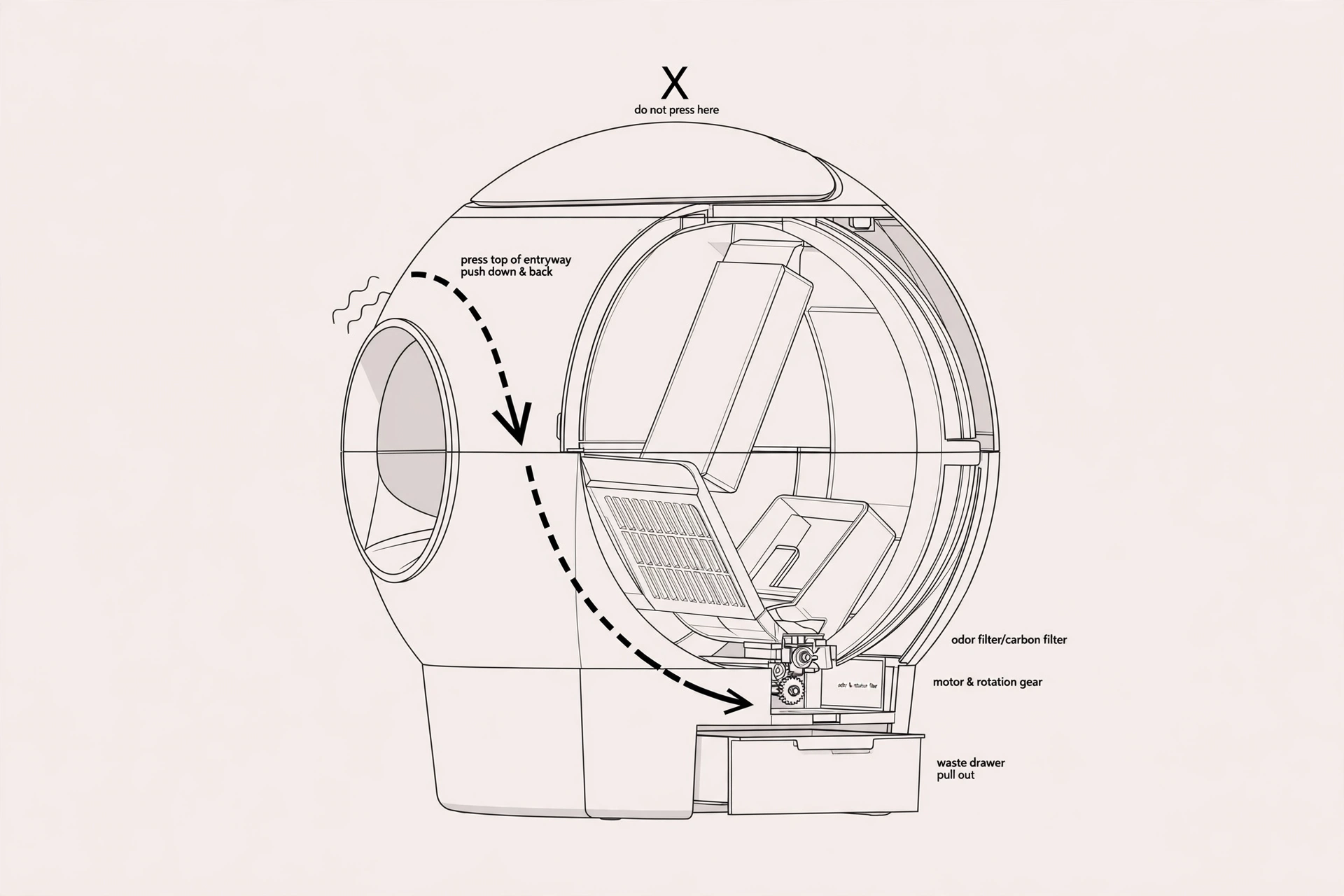
Success check: the unit returns home and displays a solid blue light. If it still flashes red after these steps, Whisker says the base needs to be replaced — contact their Customer Experience team (under warranty, WhiskerCare covers the replacement part).
Litter-Robot 4
The LR4 has the most red patterns of any model, and they mean different things. Match yours exactly.
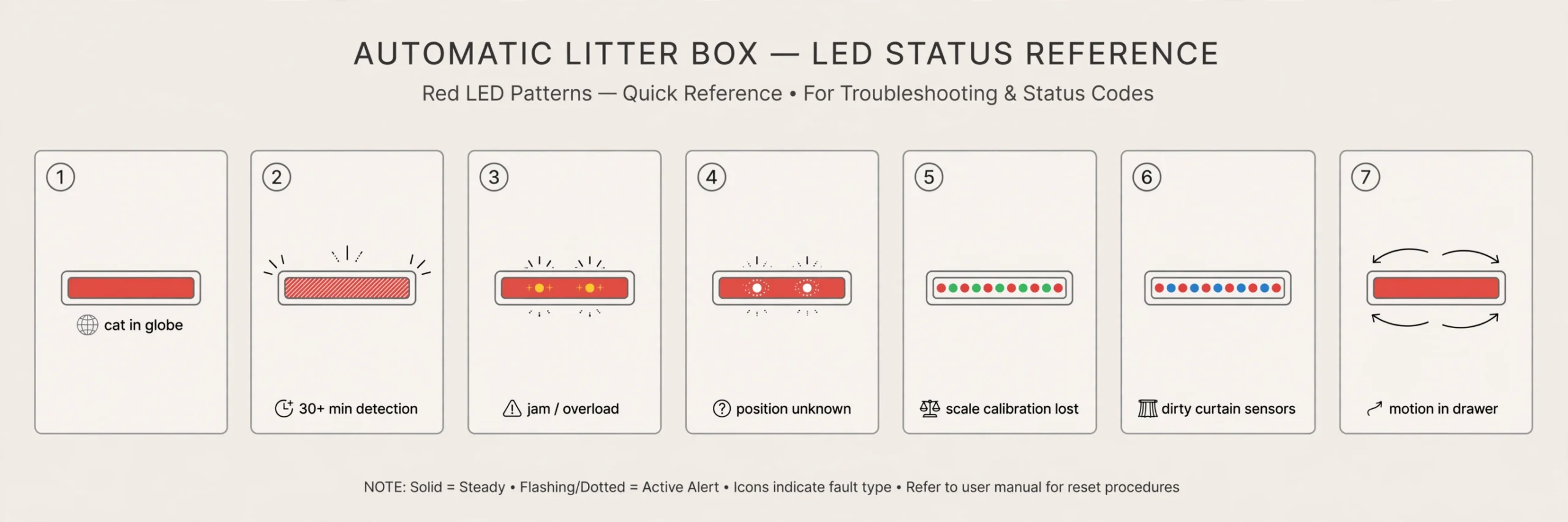
Solid red: cat in the globe
The cat sensor was triggered — a cat entered the globe. The unit will cycle once the cycle-delay countdown finishes, or you can short-press Reset to cancel the countdown. (The default cycle delay is 7 minutes; it can be changed in the app.)
Flashing red: cat or weight detected for 30+ minutes
Same 30-minute threshold as the LR3. Whisker’s fix sequence for this code:
- Remove excess litter if it’s above the fill line.
- Make sure the unit is not on carpet, a litter mat, a power cord, in a grout line, or touching any walls.
- From the Home position, press the Reset button twice to zero the weight scale. (You can also press Reset in the Whisker app Controls.)
- If the unit is stuck mid-cycle, long-press the Reset button for 3 seconds to zero the weight scale.
Red with 2 flashing yellow: jammed or overloaded globe
The motor detected an obstruction or jam and stopped; the unit retracts and attempts to continue, and if it can’t, it displays this code. Per the manual: turn the unit off, remove the bonnet and the globe, check for gear/motor obstruction, reassemble, verify the litter level is correct, then power on and let it cycle. If the globe is stuck mid-cycle, you can open the bonnet and manually rotate the globe back toward the Home position first.
Red with 2 flashing white: globe position unknown
The unit can’t detect the globe’s position. Reseat the globe (the large black gear at the rear should engage easily with the smaller drive gear in the base) and power the unit back on. The unit continues to function in Automatic Mode, but if the code persists, contact Customer Experience.
Red and green alternating: scale calibration lost
This one has no DIY fix: the unit lost its factory scale calibration values. Submit a support request — Whisker replaces the base for this fault.
Red and blue alternating: curtain sensors need cleaning
The three laser (curtain) sensors in the top of the bezel are dirty. Wipe the bezel area where the sensors sit with a dry, clean cloth, and vacuum the inside perimeter of the bezel with a brush attachment, passing over the holes at the top. (Updating firmware via the Whisker app is also part of Whisker’s guidance for sensor faults.)
Red ping-pong: motion in the waste drawer
One red light sweeping back and forth means the cat-presence motion sensor detected motion in the waste drawer; the globe rotates to the Dump position so whatever is inside can exit. Per Whisker’s guide:
- Check inside the waste drawer for any foreign object.
- Short-press the Reset button to clear the fault — the unit should return Home with a blue light bar.
If it persists, the deeper check (per the same guide) is to remove the bonnet and globe, make sure both pinch bars at the sides of the dump port are free of debris (press each inward — you should hear a click), and inspect the cat-presence sensor and its circuit board for damage or corrosion before reinstalling everything.
Brief red flash when pressing a button: lockout mode
If the light bar briefly flashes red when you press any button, the unit is in Control Panel Lockout Mode — the buttons are intentionally disabled to prevent accidental changes. This is normal behavior, not a fault.
Drawer full on the LR4 is a blue code, not red. If the drawer is the problem, the light bar flashes blue — see Litter-Robot Flashing Blue Light: What It Means and How to Fix It.
Litter-Robot 5 (and EVO)
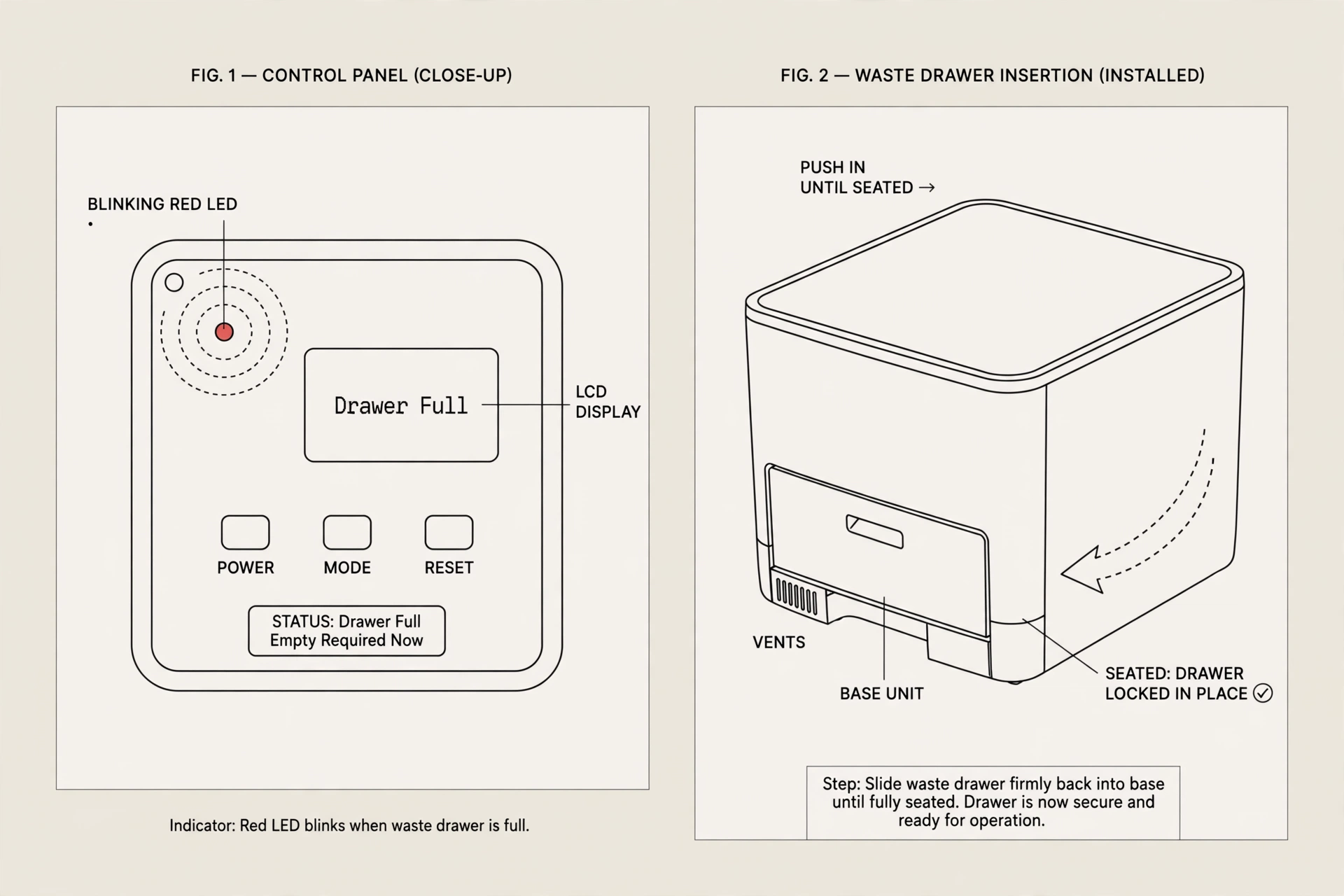
On the LR5, a blinking red LED means “product fault” — and unlike the older models, you don’t have to decode the blink pattern. Read the LCD screen first: it displays the exact fault. Here are the faults Whisker documents and the fix for each.
Drawer full
The waste drawer is full. Empty the drawer and press Cancel to dismiss the message. Two details worth knowing: the robot will still run two more Clean cycles before it stops automatic cycling, and Whisker recommends white drawer liners (pressed flat against the sides and bottom) for the most accurate level readings. After emptying, press Cancel to zero the weight sensors.
False “drawer full” readings: if the message appears with an empty drawer, the curtain sensor in the bezel (which looks down into the drawer during each cycle) may be dusty or blocked. Wipe it gently with a soft, dry microfiber cloth — no water, liquids, wipes, vacuums, or compressed air on the bezel electronics. If readings stay wrong, Whisker’s calibration guide has a specific button sequence: with a clean, empty drawer (a sheet of plain white paper on the bottom, no liner), power the unit off, wait 5 seconds, then short-press Connect → Cancel → Connect → Empty → Cycle in order, each within 5 seconds of the last. The unit runs a lamp test and recalibrates.
Drawer almost full on the LR5 is a yellow code, not red. If you’re seeing blinking yellow, see Litter-Robot Flashing Yellow Light: What It Means and How to Fix It (LR3 vs LR4 vs LR5).
Drawer removed
The waste drawer isn’t fully inserted. Slide it back in firmly until it seats.
Drawer obstructed
Something is blocking the drawer from seating or moving correctly. Remove the drawer, clear debris or objects, and reinsert it securely.
Motion in drawer
Motion was detected in the waste drawer. The globe rotates to the dump position to let anything inside exit, then waits for you to press Cancel or returns Home automatically after 5 minutes. Remove the drawer, check for obstructions, reinsert it fully, and press Cancel to reset.
Extended scale activity
The robot detected continuous weight on the base for over 30 minutes. Make sure nothing is resting against or underneath the unit, reposition it on a level surface, then press Cancel to reset the weight scale.
Bonnet removed
The bonnet isn’t seated correctly. Align the bonnet hinge at the back of the base, make sure the latches on both sides click securely into their slots, then press Cancel to zero the weight scale.
Motor fault
The motor met resistance or can’t rotate. Remove excess litter, check for blockages, and restart the unit.
Position fault
The robot can’t find or hold the correct globe position after three attempts. Remove the globe, reseat it fully (the black gear must engage easily with the smaller drive gear in the base), power the unit back on, then press Cancel followed by Cycle to run a test cycle.
Board fault
A system board issue was detected. Do a hard reset: long-press the Power button for 6 seconds. If the message returns, contact Whisker support.
Power fault
The robot isn’t receiving stable power. Use the original Whisker power adapter, make sure it’s secure at both the unit and the wall, and test another outlet. If the fault persists, a new power supply or base may be needed.
Blinking red during factory reset — normal
If you started a factory reset (holding Cycle + Cancel for 3 seconds), the LED blinks red while the LCD walks you through confirming the process. That’s expected behavior, not a fault.
Pro models: camera LED blinking red
On Litter-Robot 5 Pro units, a separate camera LED blinking red means a cloud connectivity or cloud service error (distinct from the main LED’s product-fault code).
FAQ
Is a flashing red light an emergency?
No — on every model it’s a status or fault signal, not a damage warning. The unit stops or pauses cycling as a safety measure. Identify the exact pattern (or read the LR5’s LCD), work through the matching fix, and contact Whisker support if the code persists.
The red light came on right after cleaning. What happened?
Cleaning changes the unit’s weight, and all three models re-zero their weight sensors on demand: press Reset on the LR3, press Reset (twice from Home) on the LR4, or press Cancel on the LR5. Whisker’s manuals call for this after emptying the drawer, adding or removing litter, cleaning, or moving the unit.
My LR4 shows red and green alternating. Can I fix it myself?
No — per Whisker, that code means the unit lost its factory scale calibration values, and the base needs to be replaced. Submit a support request rather than attempting further troubleshooting.
Why does my LR5 show blinking red for a full drawer when my friend’s LR4 shows blue?
Different generations use different codes for the same condition. On the LR3 and LR4, a full drawer is a flashing blue light bar; on the LR5, “drawer almost full” blinks yellow and “drawer full” blinks red with a message on the LCD.
The red light won’t clear even after I fixed the cause. Now what?
Press the model-appropriate reset (Reset on LR3/LR4, Cancel on LR5) once more, then power the unit off and on so it takes a fresh sensor measurement during its startup cycle. If the code returns with nothing visibly wrong, the sensor or base hardware is the likely culprit — Whisker’s own guides end at base replacement for the LR3 and LR4 in that situation, so contact Customer Experience.
Related guides
- Litter-Robot Flashing Yellow Light: What It Means and How to Fix It (LR3 vs LR4 vs LR5)
- Litter-Robot Flashing Blue Light: What It Means and How to Fix It
Sources
All facts in this guide come from Whisker’s official documentation. Each link below was verified live during research.
- Litter-Robot 3: Red Light Flashing (Cat Sensor Fault) — Whisker Support: 30-minute threshold, placement checks, litter limits (10 lbs / fill line), Reset recalibration, cat-sensor test, base replacement as final step.
- Litter-Robot 4: What Do the Lights Mean — Whisker Support: complete LR4 light-code table (solid red, flashing red, red+yellow, red+white, red/green, red/blue, red ping-pong, lockout flash).
- Litter-Robot 4: Why Is My Litter-Robot Not Cycling? — Whisker Support: solid red meaning, excess-weight reset procedure (Reset twice / 3-second long press), curtain-sensor cleaning.
- Litter-Robot 4: Red Ping Pong — Motion in Drawer — Whisker Support: motion-in-drawer behavior, Reset to clear, pinch-bar and cat-presence sensor inspection.
- Litter-Robot 5: Control Panel Buttons & Functions — Whisker Support: LED code list (blinking red = product fault), Cancel/Reset behaviors, 6-second hard reset, factory-reset LED behavior, Pro camera LED codes.
- Litter-Robot EVO: Error Message List & Guide — Whisker Support: every LR5 error message (drawer full/removed/obstructed, motion in drawer, extended scale activity, motor/position/board/power faults, bonnet removed) with fixes.
- Litter-Robot 5: Drawer Full Calibration Guide — Whisker Support: how the DFI/curtain sensor measures the drawer, liner tips, and the Connect→Cancel→Connect→Empty→Cycle calibration sequence.
Manufacturer documentation is the primary source for this guide. Any practical sequencing or emphasis beyond Whisker’s stated steps is editorial judgment, not manufacturer instruction.