“My SmartSpin will not clean” sounds like one problem. On this box, it isn’t. A ScoopFree SmartSpin can fail to clean in three different ways — it doesn’t run on its own after your cat, the Cleaning Button on the front panel does nothing, or a cycle started from the app never happens — and PetSafe’s documentation does not treat those as the same complaint. The documented blockers are method-specific: one documented setting locks only the front panel, another suspends only automatic cleaning, and a number on the display is a different kind of answer altogether. So the first job is not to run a checklist. It’s to name which cleaning method is failing, then read what the box is showing.
This guide covers the PetSafe ScoopFree SmartSpin only. PetSafe’s current support hub lists PAL00-17985, PAL00-18160, and ZAL00-18160; the 2024 user guide lists PAL00-17985 and ZAL10-17986. PetSafe publishes its SmartSpin guidance at the product level rather than per model number, and it does not document different cleaning behavior for different SmartSpin model numbers, so the checks below follow that product-level scope. Nothing here applies to ScoopFree Crystal, legacy ScoopFree, ScoopFree Complete, or OpenSky/Open Top, and nothing transfers to Litter-Robot, Neakasa, or any other automatic litter box.
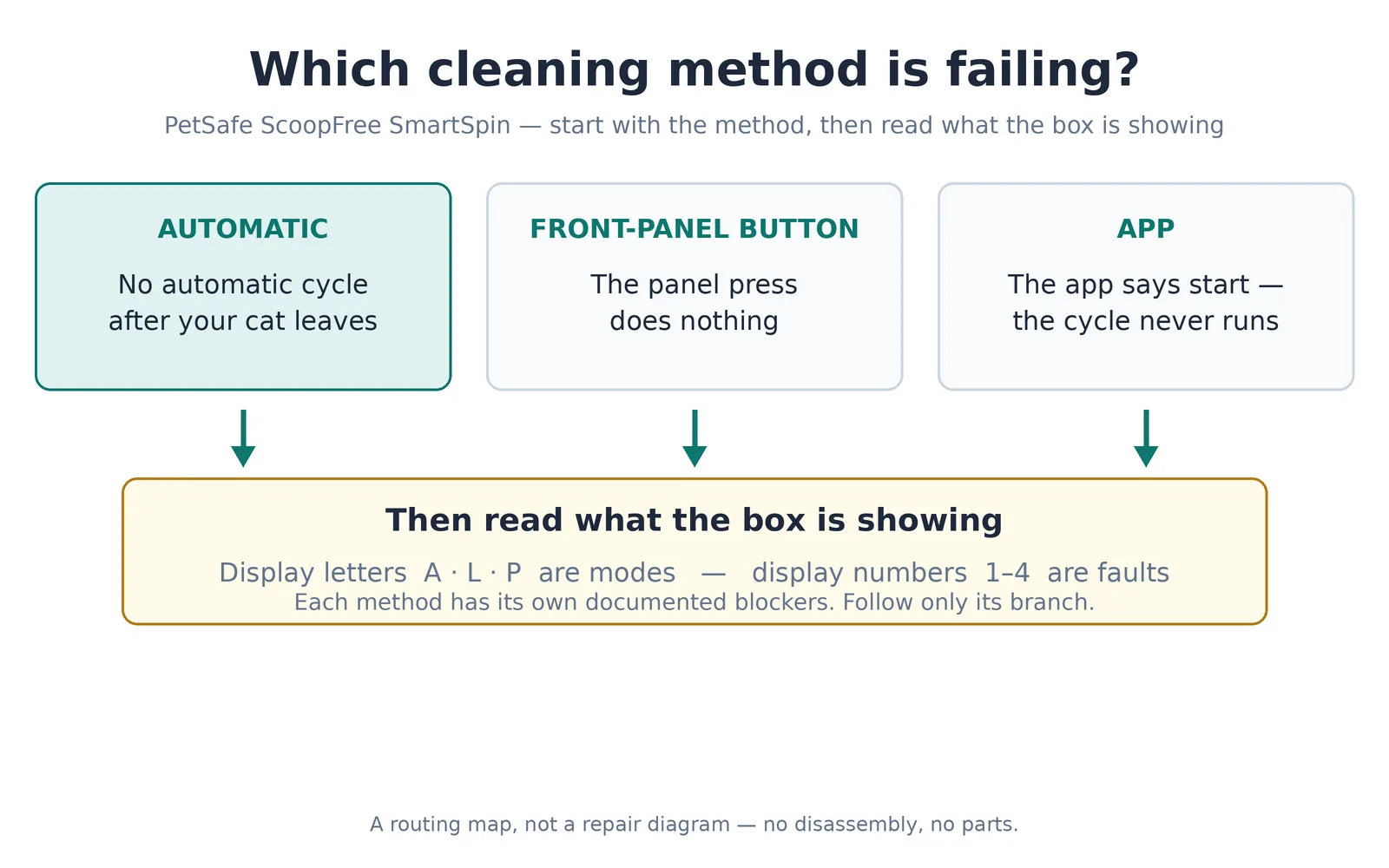
Step 1: Which cleaning method is failing?
Automatic cleaning. A weight sensor detects a change of more than 2.5 lb and the Cat Entry Light comes on. When the cat leaves, the light goes out, the Cleaning Light starts blinking, a countdown runs — 3 minutes by default — and the sphere rotates 180 degrees to sift. If the cat steps back in during the countdown, the timer stops and resets on the next exit.
Front-panel manual cleaning. A gentle one-second press-and-release of the Cleaning Button starts a cycle. Pressing the button again while a cycle runs pauses it.
App manual cleaning. In the PetSafe app, the path is Manual Cycle → OK (it asks “Do you want to start cleaning now?”), after which the app shows “Cleaning in progress” until the cycle completes.
Why the split matters: some documented states block one path and say nothing about the others. Child Lock (L) is documented to disable the panel Cleaning Button — the documentation establishes no effect on automatic cleaning or the app cycle. Sleep Mode (P) is documented to suspend automatic cleaning during its window — the documentation does not say what happens to manual cleaning in that window. A number code (1–4) is a fault state, not a method problem at all. Pick your method and follow only its branch.
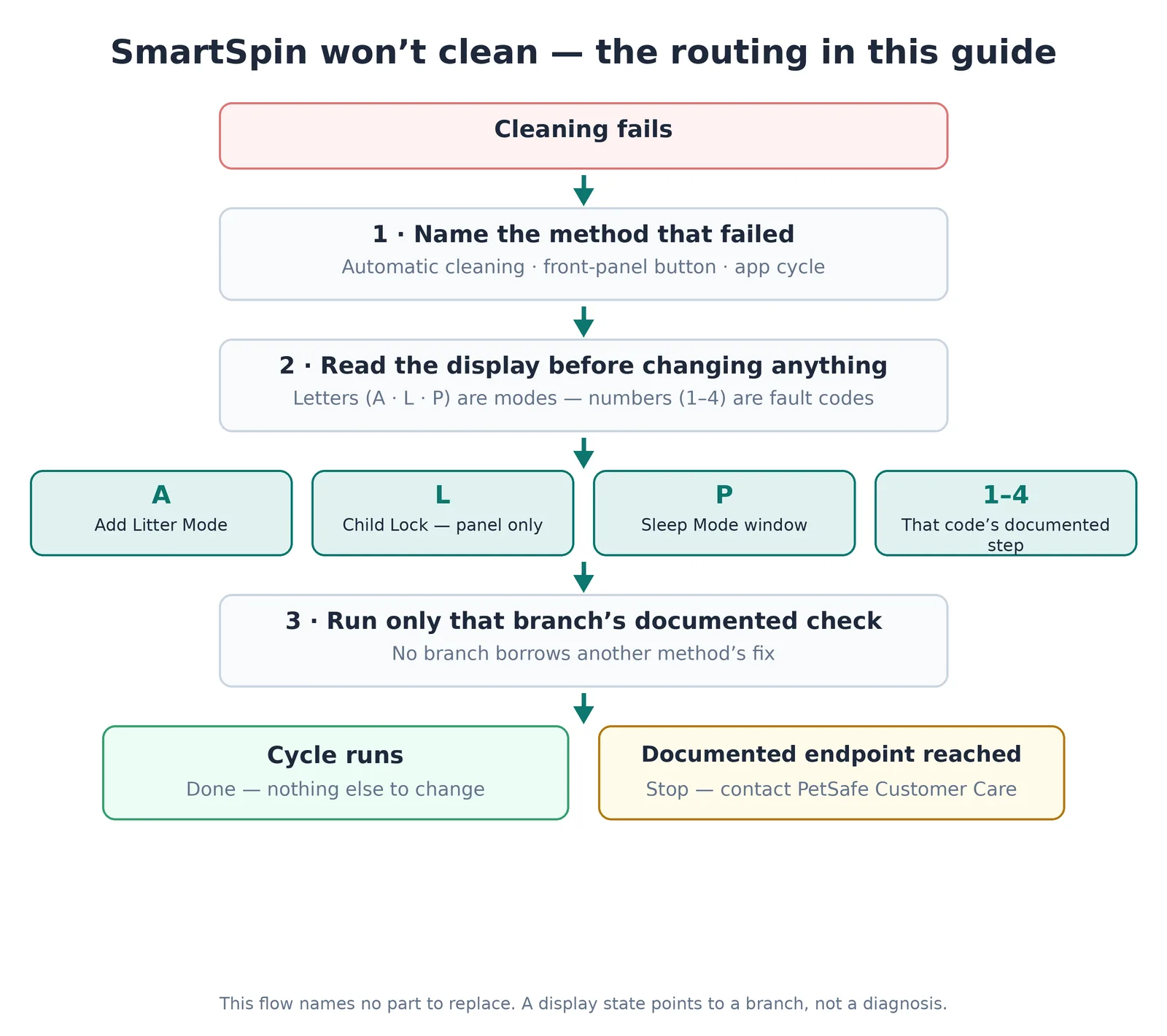
Step 2: Read the display before you change anything
PetSafe’s own user guide separates “operating modes” from “error conditions,” and the display follows that split. Letters are modes — intentional states the box is in on purpose. Numbers are error conditions — fault states.
- A — Add Litter Mode, the refill state (covered next).
- L — Child Lock is on; the control-panel buttons are locked.
- P — Sleep Mode; the box is inside its scheduled sleep window.
- 1, 2, 3, 4 — fault codes. Each has its own documented meaning and its own documented first step (the fault-code section below).
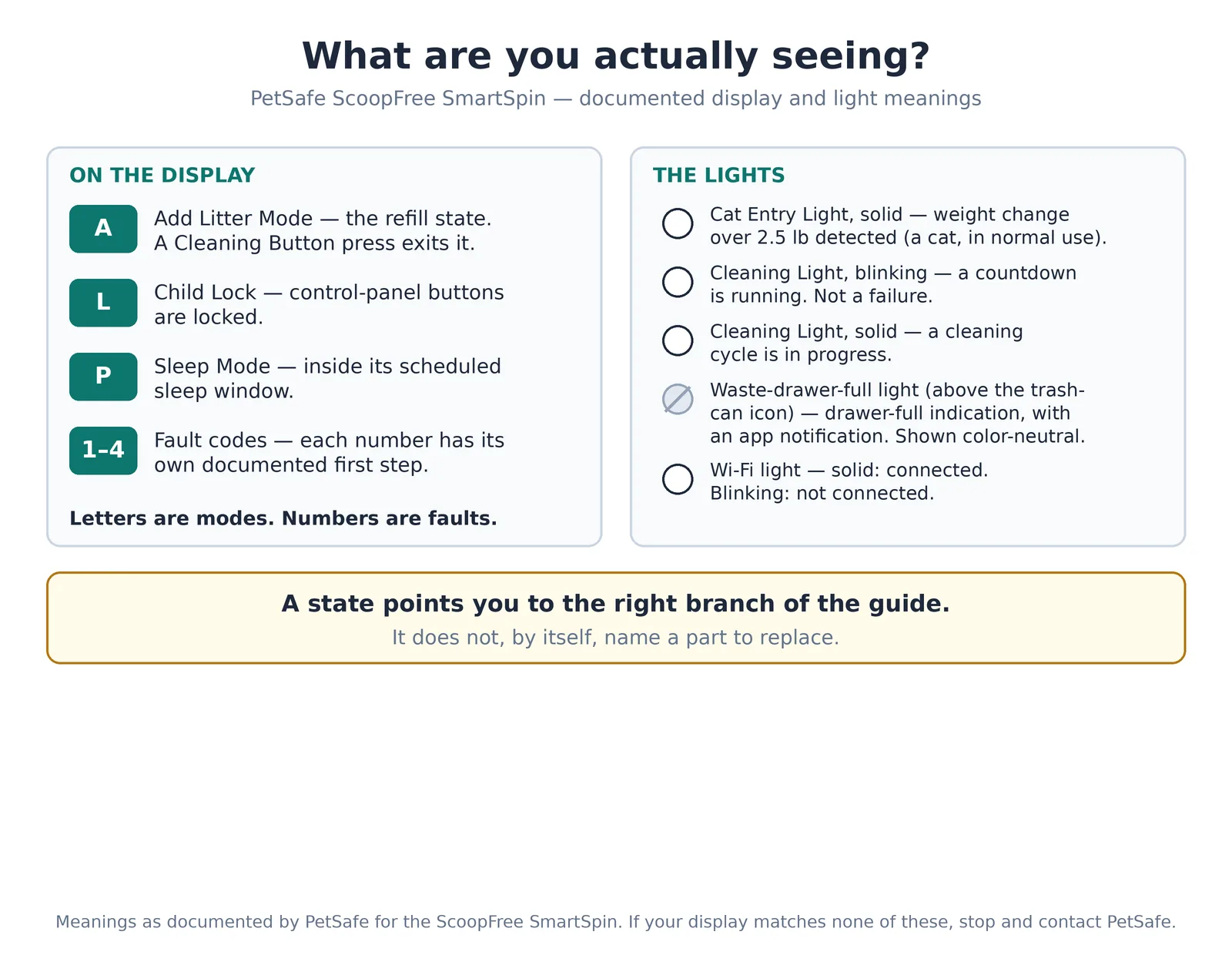
Two lights matter alongside the display:
- Cat Entry Light. Solid white means a weight change of more than 2.5 lb has been detected — in normal use, a cat in the box. In one specific situation it means something else: if it lights up while you’re pressing the Cleaning Button, PetSafe’s documentation says you’re pressing the button too hard, and the box will not clean until the light turns off.
- Cleaning Light. Blinking means a countdown is running — not a failure. Solid white means a cleaning cycle is in progress.
And two more indicators: the waste-drawer-full light (above the trash-can icon), with the app notification that comes with it — what that does not mean is covered in its own section below — and the Wi-Fi light: solid white means connected, blinking white means not connected.
One more observed behavior, because it confuses people after any plug-in: every time the box is plugged in, it runs a startup self-check — about 10 seconds after plug-in the sphere rotates 180 degrees, and it returns about 2 minutes later. PetSafe also warns to keep cats away while the box runs its setup self-check, because interrupting it leaves the sensors unable to detect correctly. Treat that rotation as documented startup behavior, nothing more: PetSafe’s documentation does not use it to diagnose the motor, the sensors, or anything else.
If the display shows A, the box is in Add Litter Mode
A is not an error. Add Litter Mode is the state PetSafe tells you to enter before adding litter, so the added litter’s weight isn’t read as a cat entering the box. While A is showing, pressing the Cleaning Button is how you exit the mode — that press is the exit, not a failed attempt to start a cycle. On exit, the box calibrates to the current weight of the litter.
If automatic cleaning stopped after a litter top-up, check this first. PetSafe’s refill guidance is blunt: “Only add litter when in Add Litter Mode,” and it warns that adding litter without being in this mode “may cause the unit not to automatically clean.” PetSafe’s documented remedy in its support articles is one manual clean — one gentle press of the panel Cleaning Button (the panel branch below) or one Manual Cycle from the app. PetSafe’s user guide words the after-refill step differently, telling you to power cycle the box so it calibrates to the new litter weight; that instruction is covered, as the guide words it, in “When power cycling is actually documented” below. The two are not the same step, and this guide doesn’t merge them.
Entering Add Litter Mode — where PetSafe’s own instructions disagree. PetSafe’s documentation is not consistent about how long to hold the Cleaning Button to enter this mode, and this guide won’t pretend otherwise: the user guide says 3 seconds, while other current PetSafe support articles — including the one written specifically for “will not go into Add Litter Mode” — say 5 seconds. No PetSafe document attributes the difference to a model, a revision, or a firmware version, so neither number is given here as the instruction. What both sets of instructions agree on is the endpoint: follow the instructions for your unit and continue until the display shows A, then release. If A appears, you’re in the mode, whichever hold your unit follows.
One related warning applies while entering: if the Cat Entry Light comes on as you press, you’re pressing too hard. Stop, wait for the light to go out, and try again with a gentle press.
If automatic cleaning is the method that failed
Work through what the box is showing, in this order:
The Cleaning Light is blinking, but nothing has moved yet. That’s the countdown, not a stall. The cycle starts when the countdown completes — 3 minutes by default — and solid white on the Cleaning Light means the cycle is actually running. Wait for it.
Every automatic cycle takes a long time to start. The delay is the app’s Clean Delay setting. The Clean Delay countdown runs 3 minutes by default; the delay can be adjusted in the app. PetSafe’s documentation for this model does not publish a litter-specific delay recommendation that we could verify, so follow the app’s guidance for your litter type. If cycles eventually run but start much later than you expect, review Clean Delay in the app before treating the delay as a failure.
The display shows P. Sleep Mode is on and you’re inside its scheduled window: the box will not run the cleaning cycle during the selected time period, and at the end of the window it “awakes and operates normally.” Either wait the window out, or turn Sleep Mode off in the app (Settings → Sleep Mode). What P does not explain: PetSafe documents this effect on automatic cleaning only. Its documentation doesn’t say whether a panel or app cycle runs during a sleep window, so if your complaint is a dead panel button during the window, P is not a documented answer for it.
You added litter recently. Go back to the Add Litter Mode section above — a top-up done outside that mode is PetSafe’s documented cause of exactly this symptom, with one manual clean as the documented remedy.
A kitten is the only cat using the box. This one isn’t a failure at all. PetSafe’s guide sets a boundary: until a kitten is at least 2.5 lb (1.1 kg) and 6 months old, the unit should be left unplugged — or Auto clean turned off in the app — and scooped manually. With Auto clean off under that rule, the automatic path is off on purpose.
The display shows a number. That’s a fault state, whichever method failed. Go to the fault-code section below; no automatic-branch check overrides a code.
If none of those states is showing and the box still doesn’t clean on its own, the remaining documented paths are the fault codes below and, at their end, PetSafe Customer Care.
If the front-panel button is the method that failed
The panel command is a gentle one-second press-and-release of the Cleaning Button; pressing the button again while a cycle runs pauses the cycle. Two documented states make the button look dead:
The display shows L. Child Lock is enabled, and with it, “the Cleaning Button will be disabled on the SmartSpin control panel.” The lock is controlled from the app only — open Settings in the app and toggle Child Lock off (top-right, then OK); there is no panel-side unlock in PetSafe’s documentation. Scope: this is documented as a panel lock only, with no established effect on automatic cleaning or the app cycle — so L explains a dead button, and only a dead button.
The Cat Entry Light is on. If the light came on while you were pressing the button, PetSafe’s documentation reads that as a too-hard press, and the box will not clean until the light turns off. There is no reset for this and no documented wait time: wait for the light to go out, then retry with a gentle one-second press. Don’t keep pressing through it.
The display shows A. That press was consumed as exiting Add Litter Mode (see the A section) — it wasn’t a cleaning command at all.
The display shows a number. Fault state — go to the fault-code section.
If the app command is the method that failed
The documented app path is Manual Cycle → OK, after which the PetSafe app shows “Cleaning in progress” until the cycle completes. That path presumes the box is connected, so the documented check is the connection itself:
The Wi-Fi light is blinking. The box is not connected. This is the first thing PetSafe’s own won’t-clean checklist flags, in its words: “The litter box will go to sleep if it is plugged in and not connected to Wi-Fi.” PetSafe does not define what that puts to sleep, and its documentation does not say which cleaning methods work while the box is disconnected – so this guide makes no claim either way about cleaning while offline. That sentence is also not PetSafe’s description of Sleep Mode (P); the two are never equated in its documentation. What PetSafe does document is how to reconnect: a 2.4 GHz network (a combined dual-band network will not connect), and re-pairing through the Wi-Fi Reset Button – press it and wait until the Wi-Fi indicator blinks, then follow PetSafe’s pairing walkthrough (the box broadcasts a temporary SmartLifeXXXX network). The Wi-Fi Reset Button is a connection tool only, never a documented cleaning repair. PetSafe’s app also sends an offline notification once the box has been disconnected for 30 minutes or more.
The display shows P. See the automatic branch: PetSafe documents Sleep Mode’s effect on automatic cleaning only, and does not say whether an app cycle runs during the window. P doesn’t settle an app complaint either.
The box is connected and the app cycle still doesn’t run. Then you’re outside what PetSafe’s documentation explains for this complaint. One combination to refuse: if the app command fails while the panel button works, PetSafe’s documentation does not turn that contrast into a diagnosis — no official source does, and this guide won’t build one. The documented endpoint is PetSafe Customer Care.
If the display shows a number: fault codes 1–4
A number on the display is a fault state. The right move is PetSafe’s documented step for that specific code — each code has its own meaning and its own first action, and none of them is a generic “sensor error.”
Code 1 — the infrared sensor in the base is blocked. PetSafe’s first check is the liner: it should sit down in the drawer notches, not stick up, and not cover the deodorizer. If the liner is clear, PetSafe’s documented path is to disassemble and clean the unit, following PetSafe’s own disassembly steps rather than a generic teardown; the sensors sit in recesses around the inner rim of the base, and PetSafe has you clean them with a cotton swab and rubbing alcohol. Two safety boundaries from PetSafe’s documentation govern any of that work: unplug the box first, and never rinse, submerge, or spray the base — it holds the electronics and is not waterproof, and parts must be completely dry before reassembly. If the code is still showing after PetSafe’s steps, the documented endpoint is PetSafe Customer Care.
Code 2 — the cover is not installed. Unplug the box, align the cover (PetSafe’s guide has the cover arrows facing front), make sure all four magnets are seated, and plug the box back in.
Code 3 — abnormal motor current. Unplug the box and plug it back in. Then check the weight in the app usage log: if the logged weight is not within 2 lb of accurate, PetSafe’s path leads to the gated calibration in “When calibration is actually appropriate” below. If Code 3 persists, PetSafe’s documented endpoint is Customer Care. PetSafe does not take the diagnosis further than “abnormal motor current,” and neither does this guide.
Code 4 — the sphere is not installed. Unplug the box, unlatch the sphere, and realign it on the base so the raised edge on the back of the sphere seats in the notch of the latch. Plug the box back in.
The waste-full light is an indication, not a documented cleaning blocker
When the waste drawer is full, the light above the trash-can icon comes on and PetSafe’s app sends a notification. PetSafe’s guide gives the normal emptying rhythm as about once a week for one cat, twice a week for two cats, and every few days for three or more.
One thing this guide will not tell you: that a full drawer stops the box from cleaning — no PetSafe document read for this guide says that. Emptying the drawer is maintenance, not a documented cleaning repair, and it carries no promise that cleaning resumes. Kept narrow, the branch is:
- Empty the drawer, and seat the liner the way PetSafe specifies: down in the notches, not sticking up, and not covering the deodorizer. A liner seated wrong is PetSafe’s documented false trigger for this light.
- If the light is still on with the drawer empty, run Code 1’s first checks — the liner position and the base sensor — because PetSafe documents the same liner placement in front of that sensor.
- If it still won’t clear, the documented endpoint is PetSafe Customer Care.
If the sphere won’t rotate at all
This is a different complaint from “won’t clean”: the sphere won’t turn at all. PetSafe’s documentation says this is typically caused by waste lodged inside the unit. Its documented path is a handoff, not a home workaround: unplug the box, disassemble and clean it thoroughly following PetSafe’s disassembly steps, reassemble, then give the Cleaning Button one gentle one-second press — PetSafe’s test is that the sphere rotates. If it is still stuck, PetSafe’s endpoint is Customer Care.
Scope that handoff honestly: PetSafe’s disassembly steps come in versions. Some units have a Litter Sifter Cover — PetSafe says the Litter Sifter Cover only comes with the black model and the newer versions of the white SmartSpin — and some don’t, so follow the workflow that matches your unit rather than assuming a part is there. Where PetSafe’s deeper cleaning removes the sphere’s eight screws. And the base boundary applies throughout: unplug first, the base is not waterproof, and everything must be fully dry before reassembly.
When calibration is actually appropriate
Weight calibration belongs in this section and nowhere else in this guide. PetSafe documents exactly two doors into it:
- The box is not weighing accurately — the weights in the app’s usage log are off. PetSafe’s Code 3 path draws the line at “not within 2 lb of accurate.”
- Code 3 has persisted after the unplug-and-replug step, with the app usage log off by more than 2 lb.
If neither is true, calibration is not a won’t-clean step, and this guide offers no “try recalibrating” fallback. PetSafe’s own won’t-clean checklist doesn’t use it as one either.
When a gate is met, PetSafe’s documented procedure (from its “Is Not Weighing Accurately” guidance) is:
- First, if litter was added outside Add Litter Mode, do one manual clean. Have the unit plugged in for at least 10 seconds. You’ll need two household items that fit in the box: one weighing 2 lb and one weighing 20 lb.
- Press and hold the Wi-Fi Reset Button and the Cleaning Button together until the display shows 0.
- Place the 2 lb item in the box and press the Cleaning Button once; the display changes to 9.
- Place the 20 lb item in the box and press the Cleaning Button once; the display turns off.
- Wait 3 seconds before removing the 20 lb item, then check the weights in the app’s usage log.
A deviation of 1–2 lb is normal, per PetSafe. If a significant variance persists after calibration, PetSafe’s endpoint is Customer Care.
When power cycling is actually documented
Unplugging the box appears in PetSafe’s SmartSpin documentation in specific places — and only there:
- Code 3: unplug, plug back in. It is the code’s first documented step.
- Codes 2 and 4: unplug first, before you reseat the cover or the sphere; plug back in only after the part is seated.
- After a refill done outside Add Litter Mode: PetSafe’s user guide words its instruction as a power cycle — “you will need to power cycle the litter box to calibrate it to the new weight of the litter.” Note the divergence, kept visible rather than merged: PetSafe’s support articles give a different documented remedy for the same situation — one manual clean, which is the path used in the Add Litter Mode section above. This guide doesn’t combine the two into one invented sequence.
Outside those contexts, no PetSafe document read for this guide presents a power cycle as a general fix for a box that won’t clean, and PetSafe attaches no duration to any of these steps — there is no documented “leave it unplugged for a while” move to add. (The rotation you’ll see after plugging back in is the startup self-check from Step 2: behavior, not a diagnosis.)
What not to reset
PetSafe’s SmartSpin documentation is noticeably silent about resets, and that silence is the accurate instruction:
- A clean command is not a reset. A panel press or an app Manual Cycle just runs a cycle.
- There is no documented general reset. No PetSafe SmartSpin source read for this guide describes a “reset the box” procedure or button — and none describes a factory reset or an app reset either. Reset sequences written for other litter boxes don’t transfer to this one.
- The Wi-Fi Reset Button is not a cleaning repair. It exists to re-pair the connection (see the app branch). PetSafe does not document it as fixing any cleaning failure.
- The Cat Entry light doesn’t need a reset. Waiting for it to turn off is the whole documented resolution.
- Calibration is not a reset either. It stays behind its two gates in the section above.
When to stop and contact PetSafe
Every branch above ends somewhere documented. Stop — and contact PetSafe Customer Care — when you reach one of these endpoints:
- Code 3 persists after the unplug-and-replug step (and after calibration, if its gate was met and the variance persists).
- Code 1 remains after the liner check and PetSafe’s disassembly-and-clean path.
- The sphere is still stuck after PetSafe’s disassembly-and-clean path and the one-second test press.
- The box is connected, no mode or code explains the failure, and the app cycle still won’t run.
- Nothing on the display matches any documented state in this guide.
Beyond those points, PetSafe’s documentation offers no further home step, and this guide won’t invent one. PetSafe also points SmartSpin owners to a separate customer care guide for safety and warranty topics; that document is the endpoint for those topics, and this guide doesn’t summarize material it hasn’t verified.
Quick answers
Will emptying the waste drawer make the box clean again?
PetSafe’s documentation doesn’t say a full drawer stops the box from cleaning — the light is an indication, with an app notification. Empty the drawer on the documented rhythm; if the light stays on with the drawer empty, check the liner seating and the Code 1 sensor path.
How long do I hold the Cleaning Button to enter Add Litter Mode?
PetSafe’s own documents disagree: the user guide says 3 seconds; other current PetSafe support articles say 5 seconds, and no PetSafe document ties the difference to a model or revision. Use the instructions for your unit and continue until the display shows A — that endpoint is the part both sets of instructions share.
Does Sleep Mode also stop manual cleaning?
PetSafe documents Sleep Mode’s effect on automatic cleaning during its scheduled window, ending with the box awakening and operating normally. Its documentation doesn’t say what happens to panel or app cleaning during the window, so don’t treat P as the explanation for a manual-cleaning failure.
Is there a factory reset for the SmartSpin?
Not in PetSafe’s SmartSpin documentation: no general reset, factory reset, or app reset procedure is documented for this box. The only “reset” PetSafe documents is the Wi-Fi Reset Button, and that is a connection tool, not a cleaning repair.
Can I recalibrate the box to fix a won’t-clean problem?
Only through the two documented gates — the box weighing inaccurately, or Code 3 persisting with the app usage log off by more than 2 lb. Outside those, PetSafe doesn’t present calibration as a won’t-clean repair, and neither does this guide.
Editorial responsibility: Mohammed Algaari — Founder & Editor