The lid on a SureFeed only opens when the reader in the front hoop reads a microchip the feeder has already stored. So “won’t open” is not one problem. Your cat’s chip may never have been learned in the first place. It may have been learned and then stopped reading — dirt on the hoop sensors, tired batteries, interference, or a chip that has shifted under the skin. Or the feeder may still be sitting in training mode, where the lid deliberately doesn’t seal. Those need different fixes, and the rear light tells you which one you’re in before you touch anything.
Scope: This guide covers the SureFeed Microchip Pet Feeder, model MPF001. The app version (SureFeed Microchip Pet Feeder Connect, model iMPF) shares the first checks but has differences that matter — they’re fenced off in their own section below. If your problem is a SureFlap cat flap that won’t unlock, that’s a different device with different procedures — see our SureFlap SUR001 guide instead.
Start With the Rear Light
The single light at the rear of the feeder has four documented meanings on the MPF001. Match yours before doing anything else — the fifth row is our inference, not something the manual documents:
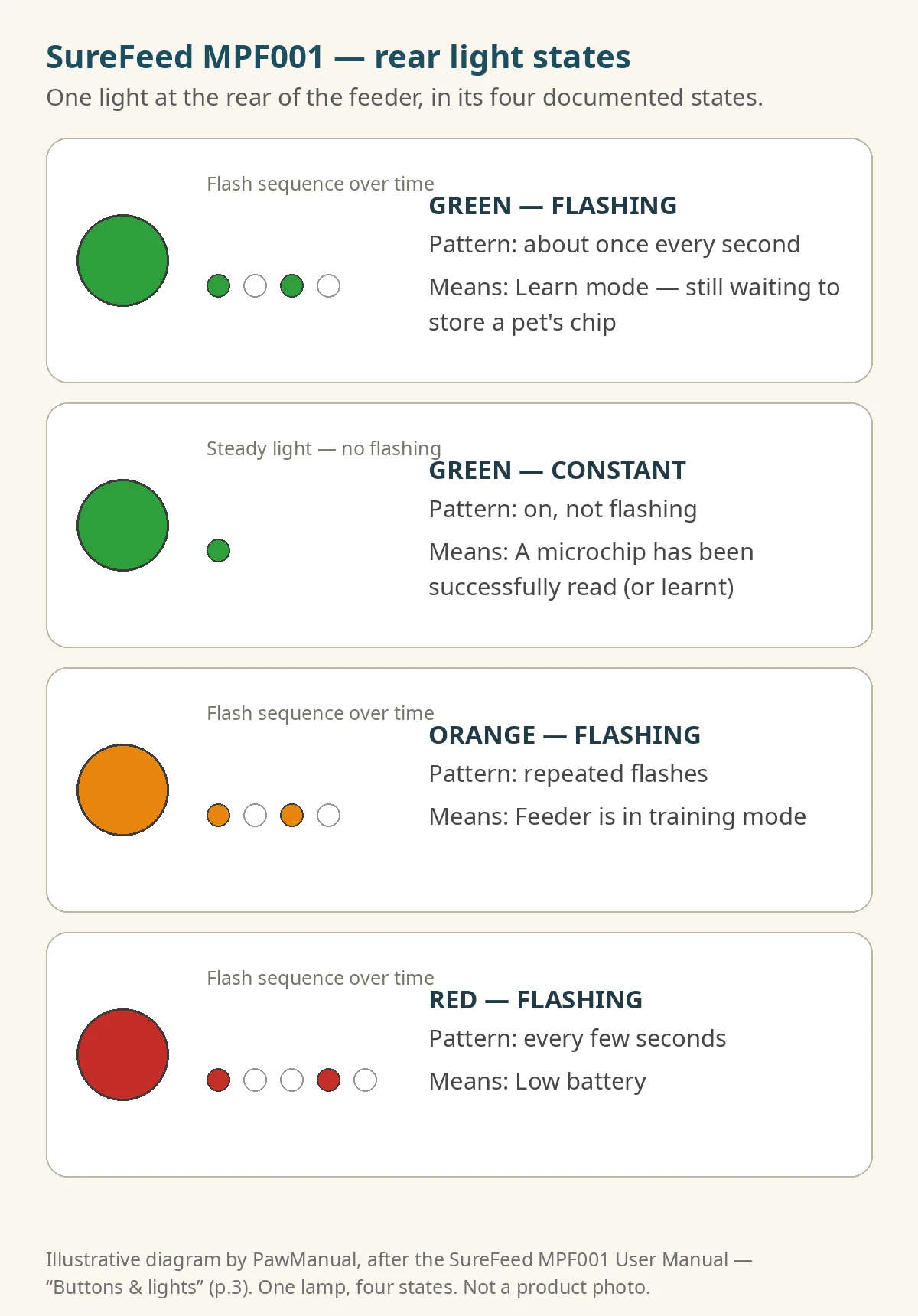
| What the light is doing | What it means | Go to |
|---|---|---|
| Flashing green, about once a second | The feeder is in learn mode, still waiting to store a chip | Step 5 — the learn never completed |
| Constant green while your pet is at the hoop | A chip was just read — the feeder recognized your pet | If the lid doesn’t slide open anyway, Step 2 (lid movement) |
| Flashing orange | The feeder is in training mode — the lid intentionally does not close fully | “It opens, but the wrong pet eats” below |
| Flashing red, every few seconds | Low battery | Step 1 |
| No light at all, pet at the hoop, nothing happens (not a documented meaning — our inference) | No successful read — or no power | Step 1, then Step 2 |
One fact that kills a common wrong first step: a learned chip is stored permanently and survives battery changes (manual, p.8). Swapping batteries does not erase your pets, and you never need to re-teach a pet just because the batteries came out.
Step 1 — Batteries First
TEST: Turn the feeder over and check you have 4 × 1.5V alkaline C cells, all good quality, all fitted with the +/− matching the feeder’s markings. Sure Petcare states the feeder is not designed for rechargeable batteries.
EXPECTED RESULT: If the rear light was flashing red every few seconds, that stops with fresh alkaline cells. If the feeder was completely dead, it comes back to life.
IF NOT: Go to Step 2.
Step 2 — Does the Lid Move at All?
This is a routing test, not a chip test. (The button’s documented job is opening the lid for refills; using it to separate “lid mechanism” from “chip reading” is our triage logic, not a named Sure Petcare diagnostic.)
TEST: Press the Open/Close button at the rear.
EXPECTED RESULT: The lid slides open; press again and it closes and seals.
WHAT IT MEANS: The lid moved under power on command, so look at sensing or learning next (Step 3) rather than at the mechanism. A lid that moves doesn’t certify every part healthy — it routes the checks; it doesn’t finish them. If the lid does not move with fresh batteries correctly fitted, skip the chip steps entirely and go to When to Stop and Contact Sure Petcare. Never pry or force the lid.
Step 3 — Clean the Four Black Dots
TEST: Look inside the hoop at the front of the feeder. There are four black sensor dots. Wipe them clean with a damp cloth, and wipe the feeder’s surfaces while you’re there — Sure Petcare ties unreliable operation directly to these dots staying clean (manual, p.15).
EXPECTED RESULT: A pet whose chip read intermittently starts unlocking normally again.
IF NOT: Step 4.
Step 4 — Move It Away From Appliances
TEST: If the feeder sits against a refrigerator or another large metallic or electrical appliance, move it away and retest over a day. Sure Petcare’s position is that nearby appliances are normally not a problem — but if operation is unreliable, relocation is the documented remedy (manual, pp.13, 16).
EXPECTED RESULT: Intermittent reads — works in the morning, fails by evening — stabilize.
IF NOT: Step 5.
Step 5 — Re-learn the Chip Properly
This is the step owners most often get half-right. The feeder only stores a chip when the hoop sensors detect the pet actually eating — the manual is blunt that waving your pet in front of the feeder has no effect at all (p.8).
TEST:
- Keep every other pet — and any spare collar tags — out of the room. If the wrong pet is learned, the documented fix is a full reset and re-learn (Step 7), so don’t rush this.
- Press the Add Pet button at the rear. The lid opens and the light flashes green about once a second.
- Put food or treats in the bowl and place the feeder where your pet normally eats.
- Let your pet eat with its head through the hoop.
EXPECTED RESULT: When the chip is stored, the flashing stops and the light stays on. When your pet walks away, the lid closes and the light goes out. That ID is now permanent (Step 1’s note applies). Repeat per pet — the feeder stores up to 32.
IF the light never stops flashing even though your pet is eating through the hoop, the reader isn’t seeing the chip. Go to Step 6 — do not keep repeating the learn, and do not reset yet.
Step 6 — Is It the Chip or the Feeder?
If the feeder learned your pet once and now only opens when your cat pushes its head deep inside — or won’t read at all — suspect the chip’s position before the feeder. Microchips can shift under the skin, and Sure Petcare’s own troubleshooting ends at the same place (manual, p.16): ask your vet to confirm the chip is working and still in its normal place. A feeder cannot test, reposition, or repair an implanted chip.
The OEM fallback: if the chip has moved significantly or there is no chip, learn the included SureFlap RFID Collar Tag instead — repeat Step 5 with the tag. The tag must be worn on a safety collar with a breakaway buckle (the manual is explicit, and Sure Petcare accepts no liability for collar injuries).
Isolation logic (our routing, not an OEM-named test): if the collar tag learns and unlocks cleanly but the implanted chip doesn’t, that points toward a chip-side problem — have the vet check the chip’s position and condition. It suggests the reader is working, but it doesn’t prove it. If the tag also fails after Steps 1–4, home checks are exhausted: contact support rather than assuming a reader fault (see When to Stop).
“It Opens — But the Wrong Pet Still Eats” (and Other Non-Faults)
Check training mode first. If the rear light is flashing orange, the feeder is still in training mode: the lid is supposed to stay partly open, and during training, pets can legitimately eat from each other’s feeders (manual, pp.9–12). That’s documented training behavior, not a fault signal. Press the Training Function button to advance the stages, or hold it for about 5 seconds to exit training mode entirely; the orange flashing stops when the feeder is sealed in daily-use mode.
Then the lid-close delay. Underneath the MPF001 is a three-position slider: I = shortest delay, II = default, III = longest. If a greedy pet steals food after yours finishes, move it to I. If your pet is nervous about the lid closing behind it, move it to III (manual, p.14).
Lid won’t close fully? That’s usually food debris caught under the lid or in the mechanism — clear it each time you replace the food, and don’t overfill the bowl (manual, pp.5, 16–17). If you’ve removed the lid for washing (hand-wash only, never the whole feeder in water or a dishwasher), refit it flat and in front of the lever — behind the lever is the documented incorrect position (p.15).
Step 7 — Factory Reset (MPF001 Only, Last Resort)
Only after Steps 1–6. This erases every stored pet — the manual documents no per-pet delete; its only documented remedy for a wrongly learned pet is a full reset and re-learn — and you will re-teach each animal from Step 5.
TEST: Hold the Add Pet button down for 10 seconds, until the light starts alternating red/green and the lid opens and closes (manual, p.16). Then re-learn each pet.
EXPECTED RESULT: A clean memory. If a wrong pet was learned, or learning was corrupted, it now learns correctly.
IF a known-good pet still won’t learn after a reset: stop and contact support. A learn failure that survives Steps 1–6 and a reset is beyond the documented home checks; on its own it doesn’t prove a reader fault.
Connect (iMPF) Owners: What Carries Over, What Doesn’t
The first checks are the same on the Connect: 4 × 1.5V LR14 alkaline C cells (its quick-start guide adds that exhausted or incorrectly inserted batteries flash the rear light red every five seconds), clean hoop sensors, relocation away from metallic/electrical appliances and electrical-noise sources such as faulty flickering lights, and a vet chip check with the collar-tag fallback. Pets can also be assigned to the feeder in the app (Household section).
Three fences:
- If the lid opens normally for your pet and the reported problem is the Hub connection, start with connection troubleshooting rather than re-learning chips. (This doesn’t assume the lid keeps working while the Hub is down — only that chip re-learning is the wrong first move for a connection complaint.)
- No factory-reset button sequence is published for the Connect in its user manual. The 10-second hold in Step 7 is documented for the standard MPF001 only — don’t carry it over. Other behaviour settings are, per Sure Petcare, set up via customer support, not a button combination you’ll find on the unit.
- Don’t apply MPF001’s physical delay-slider instructions to the Connect; its lid delay is set in the app.
When to Stop and Contact Sure Petcare
Stop troubleshooting and contact customer care if:
- The lid won’t move on Open/Close with fresh, correctly fitted alkaline batteries (Step 2), or it grinds, clicks, or sticks. Do not force it, pry it, or open the unit — no owner disassembly is documented for either model, and teardown guides void the safe route.
- A collar tag also fails to learn after Steps 1–4.
- Nothing has worked after the factory reset (MPF001).
- Any part is cracked or damaged.
Warranty: both models carry a 3-year warranty from the date of purchase (proof of purchase required) covering defective materials, components, or manufacture — not wear and tear, misuse, neglect, or intentional damage. Within warranty, a failed part is replaced free; for a more serious malfunction Sure Petcare may provide a replacement product at its discretion (manual, p.18).
Contact: Sure Petcare’s help pages are at surepetcare.com/support; the feeder manual lists North America customer care at 1-855-461-4740.
While you’re working through any of this, put down an ordinary bowl. A troubleshooting session should never be the reason a pet misses meals.
Sources
- SureFeed Microchip Pet Feeder User Manual (model MPF001), Sure Petcare — buttons and lights (p.3), bowls (p.6), batteries (p.7), learning your pet (p.8), training mode (pp.9–12), placement (p.13), lid-close delay (p.14), cleaning (p.15), troubleshooting (pp.16–17), warranty and customer care (p.18). PDF: https://pdf.crutchfieldonline.com/Manuals/470/470MPF001.PDF (OEM manual, retailer-hosted copy; the manual cover points to surepetcare.com/pdf for current manufacturer PDFs)
- SureFeed Microchip Pet Feeder Quick Start Guide (model MPF001), Sure Petcare — breakaway-collar safety requirement (official quick-start guide, Sure Petcare-hosted)
- SureFeed Microchip Pet Feeder Connect Quick Start Guide (model iMPF), Sure Petcare — battery spec and low-battery light, breakaway-collar requirement, customer-support custom settings, 3-year warranty (official quick-start PDF, model iMPF; full instructions hub: surepetcare.com/pdf)
- Sure Petcare product pages: Microchip Pet Feeder · Microchip Pet Feeder Connect
- Sure Petcare advice: How to clean your SureFeed Microchip Pet Feeder · Training your pet to use the feeder
Related on PawManual: a feeder problem with a different cause entirely — food loaded but nothing dispensed — is covered in our PETLIBRO feeder not dispensing guide. And if it’s your cat flap that stopped reading the chip, use the SureFlap SUR001 guide — a different device, with its own procedures.
Editorial responsibility: Mohammed Algaari — Founder & Editor